A common misconception in cybersecurity is that if you use an 8-character password with a capital letter, a number, and a symbol, your account is secure. In reality, modern computing power has rendered traditional complexity rules completely obsolete. Setting a “simple” complex password like P@ssw0rd1! no longer stops attackers; it only creates friction for you.
The Myth of Plain Text and the Reality of Hashes
When you type your password into a website and hit enter, a secure system does not save those actual keystrokes into a database. Storing passwords in plain text is a massive security failure. If the database is compromised, the attacker instantly possesses every user’s exact password.
Instead, modern applications use cryptographic hashing algorithms (like SHA-256, bcrypt, or Argon2). A hashing algorithm takes your password and scrambles it into a fixed-length string of characters.
Plain text: hunter2
Hash (SHA-256): f52fbd32b2b3b86ff88ef6c490628285f482af15ddcb29541f94bcf526a3f6c7
When you log in, the website hashes what you type and compares it to the hash stored in the database. If they match, you are granted access. The website never actually knows your real password.
Unfortunately, plain text storage is not entirely dead. Over the past few years, several major breaches exposed companies still storing passwords without hashing them, often in legacy systems or poorly configured backup drives. If you sign up for a service and they email you your exact password back to you in a “Welcome” email, they are storing it in plain text.
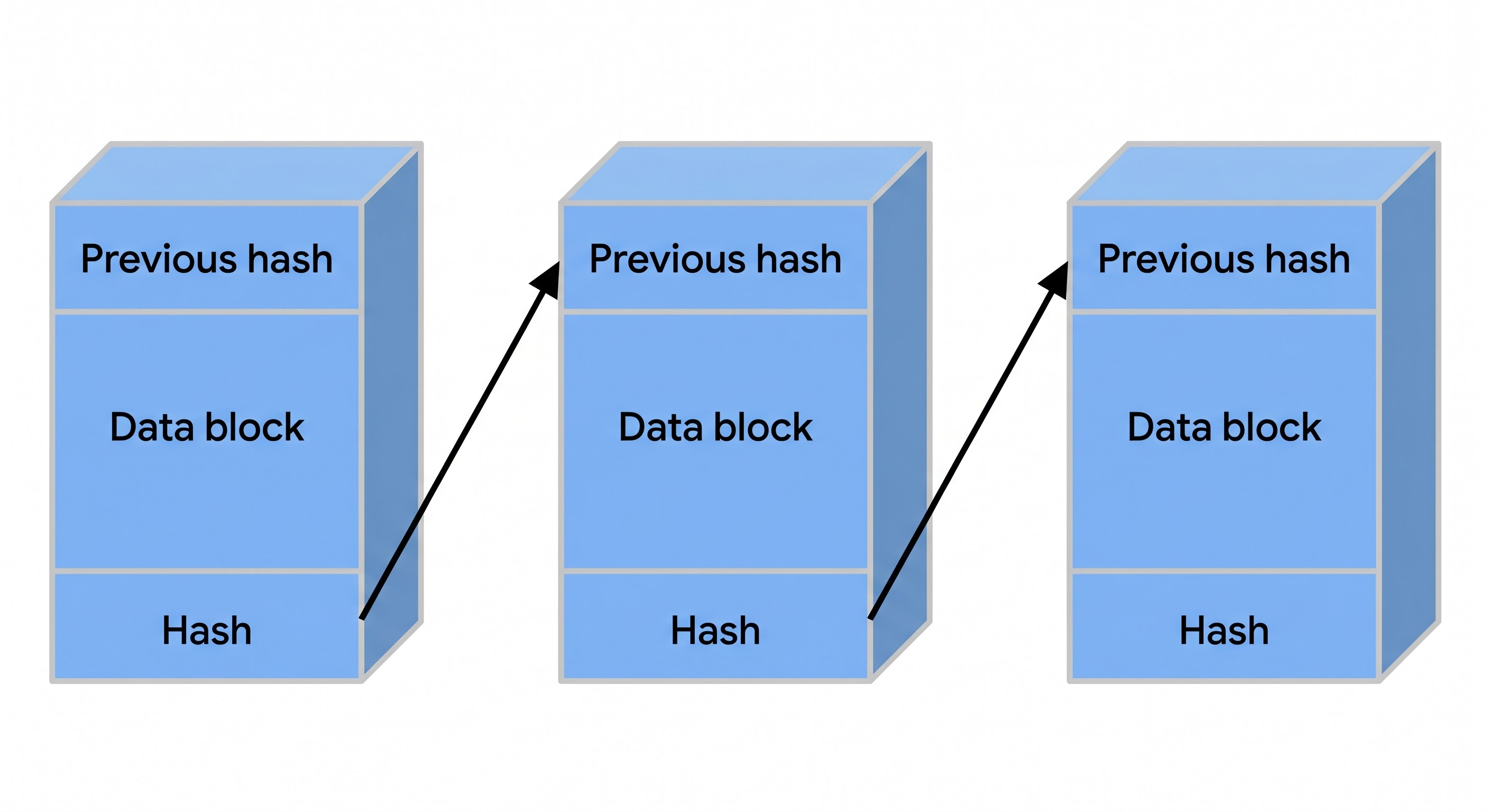 Cryptographic hashing conceptual structure.
The conceptual structure of a cryptographic hash function acts like a digital paper shredder combined with a blender. It takes an arbitrary amount of data, processes it through structural stages, and compresses it into a unique, fixed-size mathematical fingerprint.
How Attackers Get the Hash (And Why They Don’t Target Google)
Attackers do not try to guess passwords directly on a login page. Modern platforms have rate limits; i.e., if you type the wrong password a certain number of times, the account locks.
To bypass this, attackers must steal the database containing the hashes, bringing the fight to their own local hardware where no rate limits exist.
Getting this database from a tech giant like Google or Microsoft is incredibly difficult. Their backend infrastructure is guarded by layers of zero-trust architecture, advanced intrusion detection, and dedicated security operations centers. Instead of attacking the fortress, hackers target the weakest links in the supply chain.
The Password Reuse Trap
This is where human psychology compromises enterprise security.
Let’s say your Google account is secured with the password T3rm1n@l!. Google is safe, but you also used that exact same password to sign up for a local pizza delivery app or an unpatched hobbyist forum.
Attackers exploit a simple SQL injection vulnerability on the pizza app and download its poorly secured database. They now possess your email address and the hash of your password. Because they have the hash locally, they can begin cracking it offline. Once cracked, they run automated credential stuffing scripts to try that same email and password combination on Google, Office 365, and major banks.
A breach on an irrelevant website results in the total compromise of your digital life.
Demo: Cracking a Hash with Hashcat
To understand why an 8-character password is useless, we have to look at the tools attackers use. Hashcat leverages the parallel processing power of modern graphics cards (GPUs) to guess billions of combinations per second.
Let’s assume our “complex” password: T3rm1n@l!.
Since we aren’t hacking a real database for this demonstration, we are going to act as the server and generate our own hash locally by running this command:
echo -n 'T3rm1n@l!' | shasum -a 256

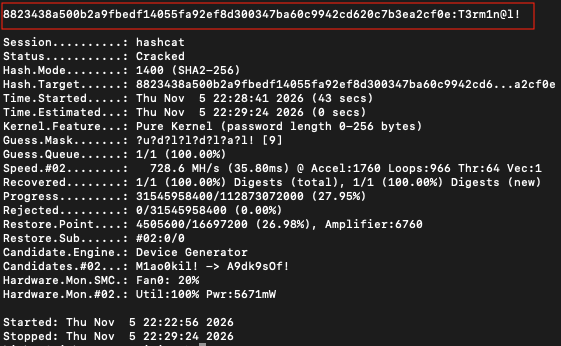
From this, we get a hash value of: 8823438a500b2a9fbedf14055fa92ef8d300347ba60c9942cd620c7b3ea2cf0e
This is what the attacker would most likely see if they manage to compromise a database with emails and hash values.
After saving the hash to a .txt file and running the command to run Hashcat:
hashcat -m 1400 -a 3 ~/Downloads/target_hash.txt '?u?d?l?l?d?l?a?l!'
The hash took around 7 minutes to fully crack. Keep in mind I ran this on my personal Mac Mini with an Apple M4 chip. Other setups would be able to bring that down to seconds.

A single consumer-grade GPU (like an RTX 4090) can compute over 100 billion NTLM hashes per second. Because a 9-character password utilizing every key on the keyboard has a finite number of combinations, the GPU will brute-force every single possibility in a matter of hours.
If the password is 8 characters long, it cracks in minutes. If they use a rule-based dictionary attack targeting common substitutions (like @ for a and 3 for e), it cracks in less than a second.
This means that anyone with some decent computing power that has your hashed password, would be able to crack it very easily. If your same password is used, the attacker would be able to use that same password on other sites.
The Modern Recommendation: Length Over Complexity
The math fundamentally shifts when you add length. Instead of forcing you to memorize an 8-character string of gibberish, the National Institute of Standards and Technology (NIST) recommends using passphrases: a sequence of words that are easy for you to remember, but incredibly hard for an attacker to guess.
Take a passphrase like: blue horse staple battery.
NIST points out that humans are terrible at rote memorization, but we are highly effective at remembering by association. By stringing together multiple unrelated words, you can paint a unique, vivid mental picture that is effortless for you to recall, but completely unpredictable to anyone else.
For example, you might create a passphrase by linking together random objects you see around your house. Even if an attacker somehow discovered your passphrase was based entirely on items sitting in your kitchen, they would still have to physically stand in your exact kitchen and guess which specific combination of nouns and verbs you selected out of thousands of possibilities. Therefore, to a password cracking algorithm, your personal human associations are functionally completely random.
Because a passphrase like this is 25 characters long, the sheer length creates so many possible combinations that a modern GPU would take trillions of years to brute-force the hash. It gives you the best of both worlds: an authentication method built for human memory, yet mathematically impossible for Hashcat to crack.
The Solution: Phishing-Resistant Passkeys
The tech industry is finally moving away from passwords entirely via the FIDO2 standard and Passkeys.
Instead of a shared secret (a password) that can be intercepted, phished, or cracked, Passkeys rely on public-key cryptography.
When you register a Passkey on your smartphone or hardware token, it generates a unique cryptographic key pair for that specific website. The public key is sent to the server, and the private key never leaves your device’s secure enclave.
When you log in, the server issues a challenge. Your device uses its private key, unlocked via your Face ID or fingerprint, to sign the challenge and send it back.
Because the private key never travels across the internet, there is nothing for an attacker to intercept. Even if the website’s database is completely breached, the attackers only get the public keys, which are mathematically useless for logging in. Furthermore, because a Passkey is cryptographically bound to the specific domain (like google.com), if a phishing site (g00gle.com) requests a login, your device will simply refuse to hand over the signature.
As infrastructure shifts toward FIDO2 standards, the arms race between GPU computing power and human memory is finally ending. Until platforms fully deprecate passwords, your best defense is utilizing unique, 20+ character passphrases, backing them with hardware-bound multi-factor authentication, and transitioning to Passkeys at every available opportunity.