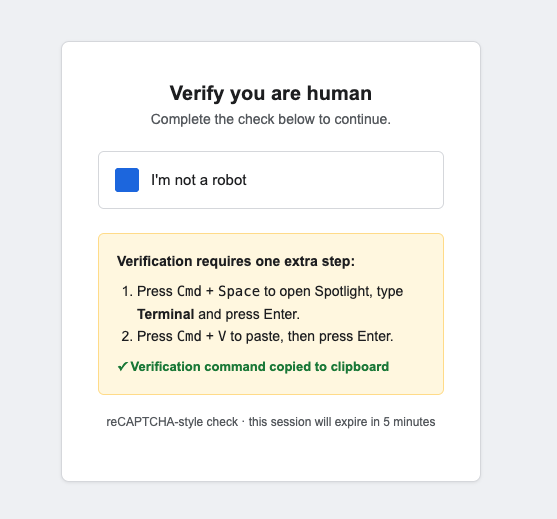
Most phishing training still focuses on malicious links and attachments. But one of the fastest-growing attack techniques right now doesn’t ask the victim to click a link or open a file at all, it asks them to copy and paste a command into their own machine, and run it themselves. It’s called ClickFix, and it works because it exploits trust in a familiar UI pattern: the “verify you are human” check.
How It Works
The page looks like an ordinary bot check. But the checkbox has no real verification logic behind it, it’s JavaScript that silently writes a command to your clipboard the moment you click, then displays “extra verification steps” telling you to open a terminal (on Windows, this is the Win+R Run dialog) and paste.
To show how it works, I built a harmless demo of it myself for macOS and for Windows. One click to verify a CAPTCHA, one paste, and Calculator opens instead of a file download or warning prompt.
- The user is first prompted with a generic looking CAPTCHA.
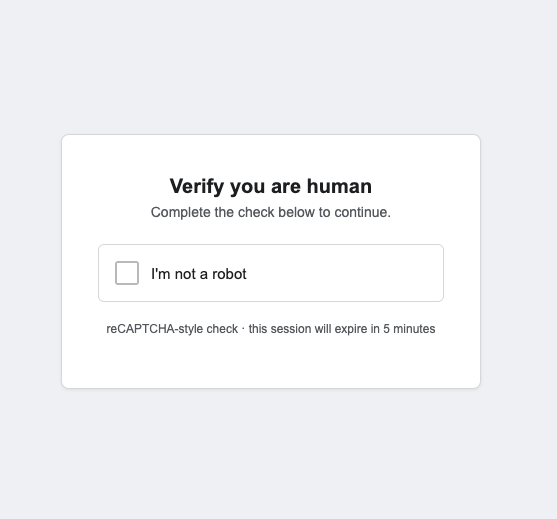
- When the user clicks “I’m not a robot”, the command is automatically copied and the user is prompted to run the short-cut to their terminal.
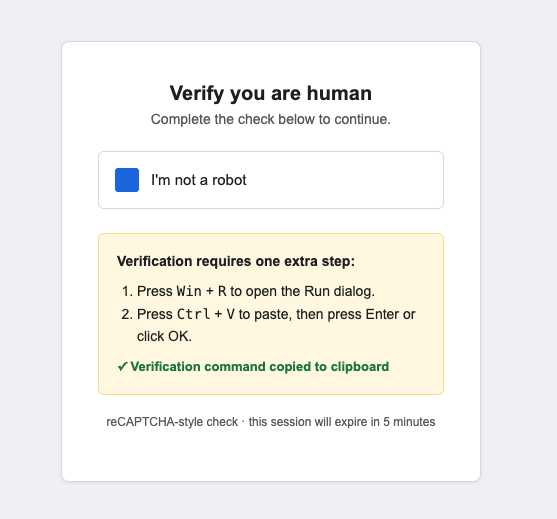
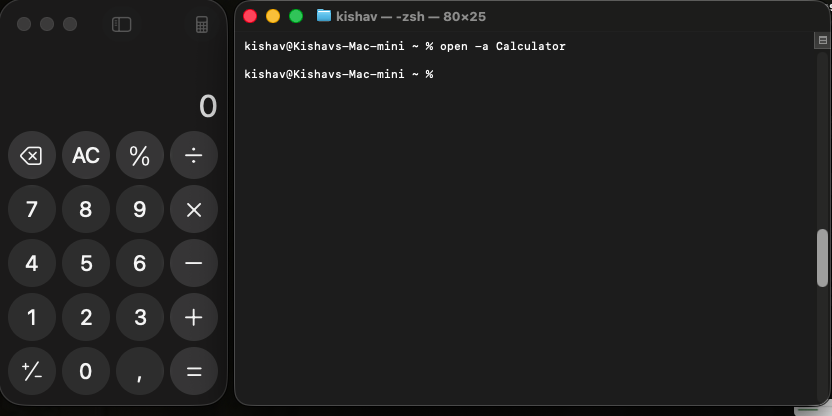
open -a Calculator
- Once the user runs the command, the application is opened. Since this is a harmless demo, it’s just a Calculator App, but attackers are using more malicious commands.
What a Real Attacker Runs Instead
I’m not including real payload commands here, for obvious reasons, but it’s worth knowing what that single pasted line typically does in an actual attack, because it’s rarely just one simple action:
- Downloads and runs a script or executable from an attacker-controlled server, often with execution policies or security prompts suppressed so nothing warns the user.
- Installs a remote access tool, giving the attacker hands-on access to the machine as if they were sitting at the keyboard.
- Deploys an information stealer, harvesting saved browser passwords, cookies, and session tokens which is often enough to bypass MFA entirely by reusing an active session.
- Drops a loader for ransomware or a follow-on payload, used as the first foothold rather than the final objective.
- Establishes persistence, so the access survives a reboot and doesn’t depend on the user running anything again.
The common thread: one pasted line is rarely the whole attack. It’s usually a small loader that fetches the real payload, which is exactly why it’s so effective at slipping past tools that scan files and downloads but don’t watch what a user types or pastes into a terminal.
How Victims Actually Encounter This
These fake CAPTCHAs don’t usually arrive as a standalone page someone stumbles on. They’re embedded into places people already trust:
- Compromised or malicious websites. A legitimate site gets compromised, or a lookalike domain is set up and promoted through SEO poisoning or malvertising, so it ranks for searches like “download [popular software]” or “[document name] pdf.”
- Fake download and update pages. Visitors are told a “security check” is required before they can download the file or software they came for.
- Phishing emails and malicious documents. A link in an email, or a QR code, leads to the page instead of a direct download, which also dodges email attachment scanning.
- Injected into real sites via malicious ads or compromised plugins. The CAPTCHA overlay appears on top of an otherwise legitimate page, so the URL in the address bar can still look trustworthy.
In every case, the page is styled to match a recognizable pattern (Cloudflare-style checks and reCAPTCHA are the most imitated), so it blends into the browsing experience people already tune out.
The Part That Does the Damage: the Clipboard Write Is Automatic
This is the detail most people miss. The moment the checkbox is clicked, the command is already on the clipboard! There’s no copy action for the user to perform, nothing visibly copied, no dialog asking permission. The “click to copy” step that exists on legitimate sites is absent here by design. All the user does from that point is open Run or Terminal and paste, because the page told them to. There’s genuinely nothing for them to inspect or verify before that paste happens; the only real defense is not pasting into a terminal or Run dialog at all because a webpage asked.

Why It’s Effective
- It looks exactly like the CAPTCHAs people complete dozens of times a day.
- It relies on the user’s own hands to execute the payload, so most endpoint controls that gate file execution never get a chance to fire.
- It doesn’t need a vulnerability. It needs about four seconds of inattention.
What Actually Helps
- Train people never to paste anything into Run, Terminal, or PowerShell because a webpage told them to full stop, no exceptions.
- Lock down or alert on Run/Terminal launches shortly after a browser clipboard write, where your EDR supports it.
- Treat “verify you’re human” steps that ask for anything beyond a click or an image selection as inherently suspicious.
This is a controlled demo with a harmless payload, not something to deploy against real targets. If this is new to you, you’re not alone, and that’s exactly why it’s worth 30 seconds of your team’s time.